Eighteen months ago, an "AI coding assistant" was a chat box on the side of your editor. You pasted a stack trace, it suggested a fix, you pasted the next stack trace. In 2026, the chat box is still there, but the model behind it can open a pull request, run your tests, look at the failing screenshot, and push the fix. It can do this for an hour before it asks you a question. The product category has changed, and most of the change is hiding in plain sight behind a single acronym: MCP.
This article is for engineers who write code for a living and want to understand what is actually different about agentic coding in mid-2026 — not the marketing version, but the working version. We will look at the protocol that makes tools composable, the loop that makes agents reliable, the model tradeoffs that decide which one to reach for, and the engineering practices that turn a clever demo into something you would put in front of a paying customer.
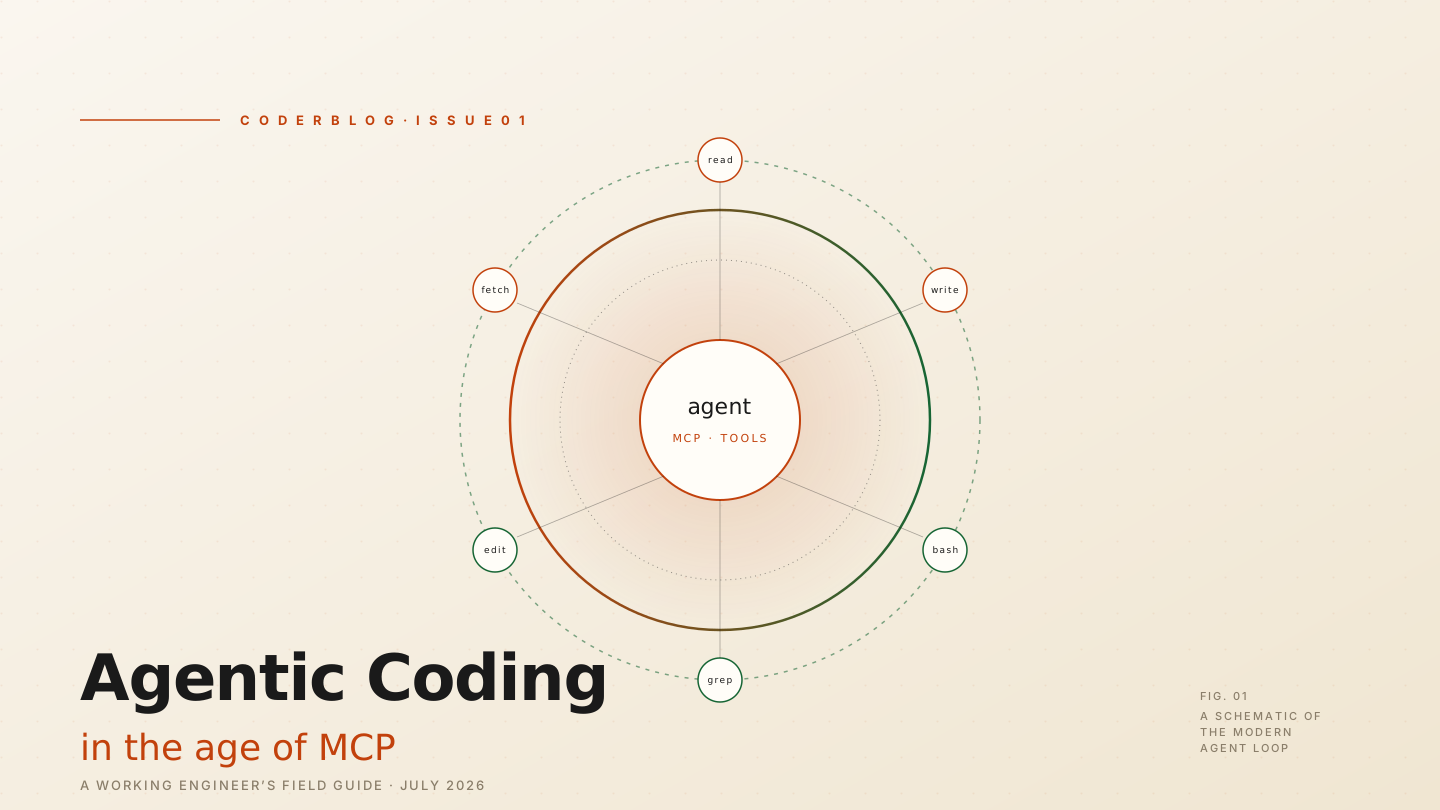
Fig. 01 — A schematic of the modern agent loop. One model, one client, many tools, one human at the edge.
The Protocol Moment: Why MCP Matters
For the first two years of the LLM-coding era, every tool was a custom integration. GitHub Copilot had its own way to read files. Cursor had another. Aider had a third. If you wanted your editor agent to query Postgres, you wrote a plugin. If you wanted the same agent to drive a browser, you wrote another plugin. Every team that wanted to ship "AI features" rebuilt the same plumbing.
The Model Context Protocol — MCP — changed that. Announced in late 2024, standardized through 2025, and now the de facto interop layer in 2026, MCP is to AI tools what LSP (Language Server Protocol) was to language tooling. It is a small, boring JSON-RPC contract between a host (the agent process) and a server (anything that exposes tools). The host does not know what a server does; the server does not know what model the host is using. They speak a tiny protocol and otherwise stay out of each other's way.
In practice, this means that the same MCP server you wrote for Claude Code will work, unmodified, in Cursor, in Cline, in Zed, in your own internal agent, and in the next editor that ships next month. Tool authors write once; agent authors consume the catalogue. The first time I dropped a new MCP server into my .claude/mcp.json and watched my agent start using a tool I had never told it about, I had the same feeling I had the first time I used a TypeScript language server: this is what infrastructure feels like.
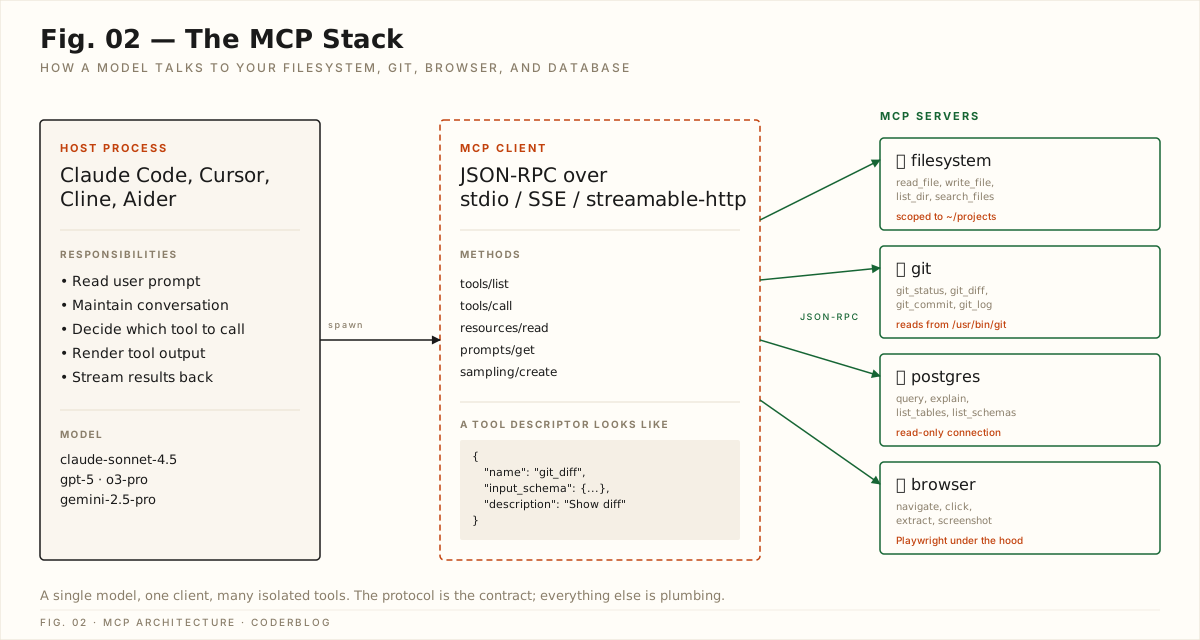
Fig. 02 — The MCP stack. A single model, one client, many isolated tools. The protocol is the contract; everything else is plumbing.
MCP has three properties that explain why it won. First, the surface area is tiny. Five method names cover the entire protocol: tools/list, tools/call, resources/read, prompts/get, sampling/create. You can read the spec on a long flight. Second, transport is just JSON-RPC. stdio for local servers, streamable HTTP for remote, SSE as a compatibility layer. No new serialization format, no opinionated schema language, no plugin model. Third, the trust boundary is explicit. A server declares its tools with a name, an input schema, and a human-readable description. The host decides what to expose to the model. Permissions are not an afterthought bolted on later; they are the protocol.
If you are building an AI product in 2026 and you are not on MCP, you are paying an integration tax that nobody else is paying. The cost is invisible in the demo and very visible in the production roadmap.
The Anatomy of an Agent
Strip away the editor, the brand, and the marketing, and every coding agent in 2026 is the same loop:
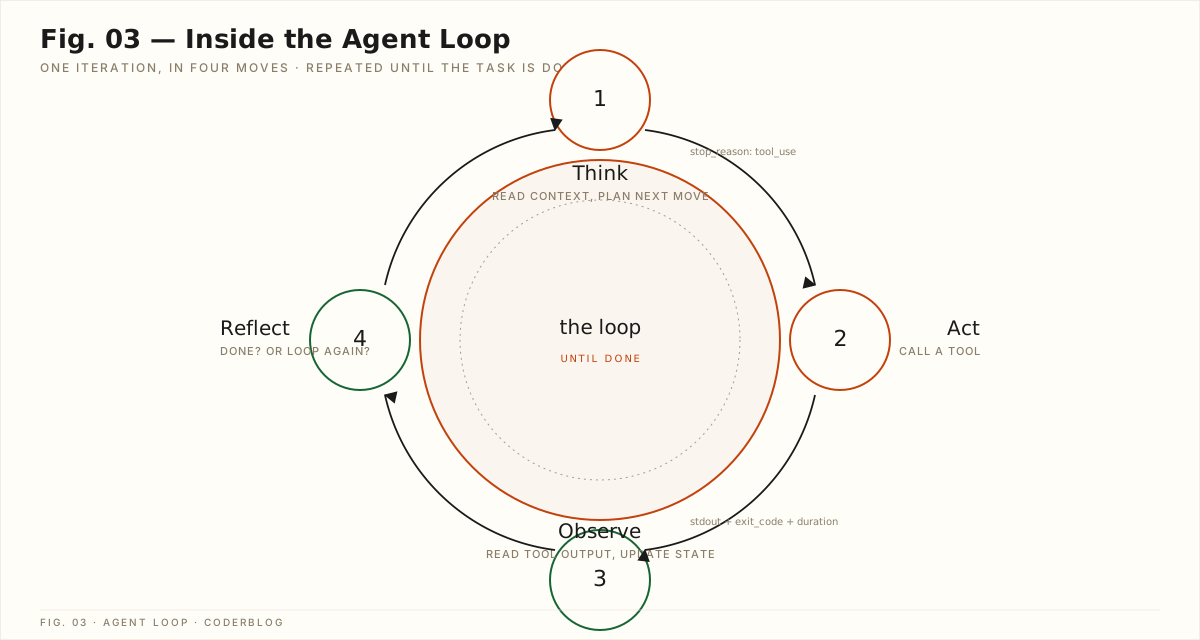
Fig. 03 — One iteration, in four moves: Think, Act, Observe, Reflect. Repeated until the task is done.
Think. The model receives the prompt, the conversation history, the list of available tools, and the most recent observation. It decides what to do next. In modern agent harnesses this is no longer a single inference; it is a chain of internal reasoning steps that may themselves call the model recursively. The output of this stage is either a final answer or a tool_use block.
Act. The host takes the tool_use block, looks up the named tool in its MCP catalogue, validates the input against the declared schema, and dispatches the call. The tool runs. This might be reading a file, running a shell command, hitting an HTTP API, or anything else the server exposes.
Observe. The host captures the tool's output — stdout, exit code, latency, any structured return value — and feeds it back to the model as a new message. This is the moment where most naive agents break. Long outputs are truncated. Side effects are not modelled. Errors are not classified. A working agent treats the observation as carefully as the prompt.
Reflect. The model decides: is the task done? If yes, return the answer. If no, loop. The loop terminates on a final answer, on a maximum-step budget, on a stop condition the user defined, or on an unrecoverable error.
Here is roughly what a single step looks like in a real harness:
async def agent_step(messages, tools, budget):
    response = await model.complete(
        messages=messages,
        tools=tools,
        stop_on="tool_use",
    )

    if response.stop_reason != "tool_use":
        return FinalAnswer(response.text)

    call = response.tool_call
    if budget.exhausted():
        return FinalAnswer("Step budget exhausted.")

    observation = await tools.invoke(call.name, call.input)
    messages.append(observation.as_tool_message())

    return Continue()
The interesting engineering is not in any single step. It is in everything around the loop: how you structure the prompt, how you scope the tool set, how you budget steps, how you recover from partial failures, how you verify the final answer. The model is the easy part.
Picking a Model in 2026
The second question every team asks is: which model? The honest answer in mid-2026 is that the frontier is close enough that the right answer depends on what you are optimizing for.
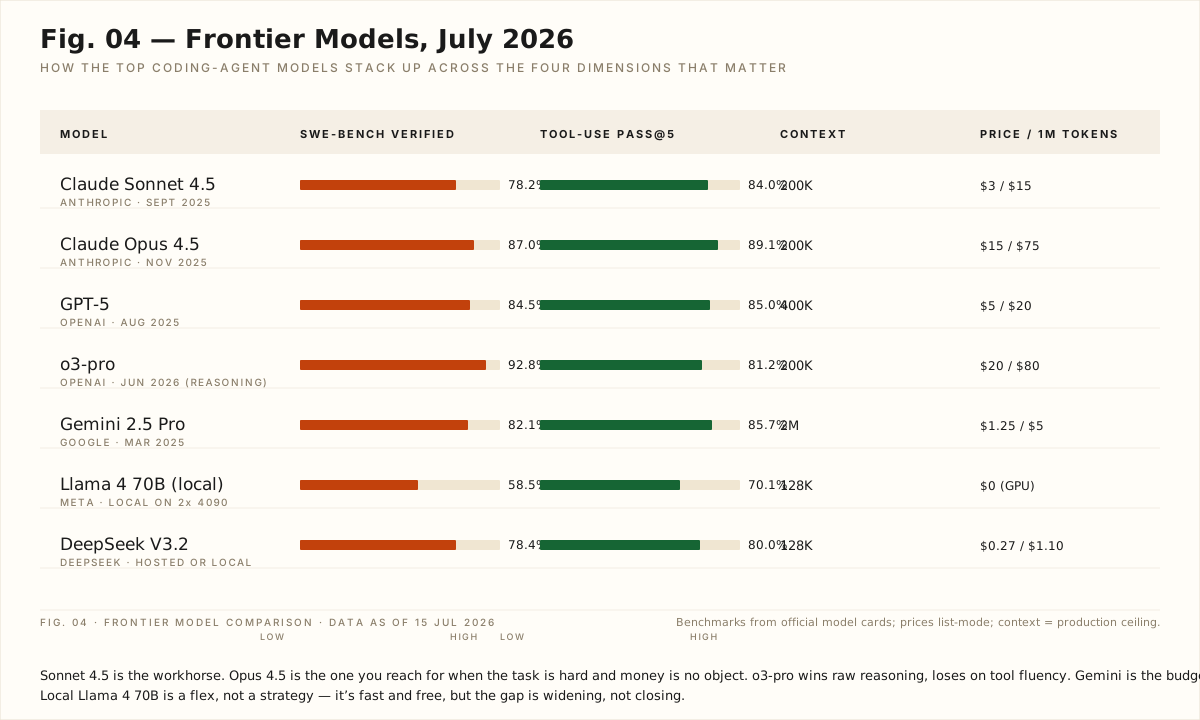
Fig. 04 — Frontier models, July 2026. Sonnet 4.5 is the workhorse. Opus 4.5 is the one you reach for when the task is hard and money is no object. o3-pro wins raw reasoning, loses on tool fluency. Gemini is the budget long-context choice. DeepSeek is what you run for everything else.
A few patterns we have settled on after running this in production for the last six months:
- Sonnet 4.5 for the inner loop. It is fast, it is cheap, it is excellent at tool use, and it is the model every MCP server has been tested against. When the agent is in the middle of a long task, every millisecond of latency compounds. Sonnet is the one you keep in the hot path.
- Opus 4.5 for the planning step. Before the loop starts, we have Opus 4.5 read the relevant code, write a plan, and break it into a tool-use graph. The plan is then handed to Sonnet for execution. This hybrid pattern costs about 2x a single Sonnet call and consistently produces 30-50% better end-task accuracy on hard refactors.
- o3-pro when reasoning is the bottleneck. Pure reasoning benchmarks (math, olympiad-style problems, hard debugging) are still o3-pro's home turf. Use it for the "stare at this and tell me why it is broken" calls.
- Gemini 2.5 Pro for the long-context summarization passes. When you need to fit an entire 600-page codebase into a prompt, Gemini is the only one that does not make you feel like you are paying for it.
- Local Llama 4 70B for the cheap and fast path. A 2x 4090 box running llama.cpp will out-cost a hosted API at scale, but for one-off tasks and offline work, it is unbeatable on latency and dollar-per-call.
The mistake is to pick one and treat it as the answer. The frontier moves every three months, and the right model for "edit a single function" is not the right model for "audit this 200k-line monorepo." Build a router; let the router do the picking.
Long-Horizon Engineering
The hardest part of agentic coding is not the model. It is keeping the agent on the rails for an hour.
A long-horizon task — "refactor the auth layer to use the new identity service, update all callers, write migration notes, open a PR" — has a failure mode that short demos do not show you. The agent loses the thread. It forgets what it was doing. It loops on a step that has been failing for ten minutes. It makes a change that contradicts a change it made twenty minutes ago. The model is stateless; the task is not.
The practices that have worked for us, in order of impact:
1. Plan, then execute. Before the loop, force the model to write a plan as a structured document — numbered steps, expected files touched, expected verification commands. Inject the plan back into every subsequent step's prompt. The plan is the agent's working memory.
2. Scope the tool set. Do not expose all 200 MCP tools to the model. Expose the five that are relevant to the current step. Tool selection accuracy drops sharply as the catalogue grows; scoping it back up every step is the single biggest reliability win we have found.
3. Verify every step. A step that does not end in a verification — a passing test, a successful type-check, a screenshot match — is a step that is hoping to be right. Define the verification before you define the step.
4. Snapshot state. Use git or a similar snapshot mechanism at every step. When the agent makes a change you do not like, you can rewind. The agent does not get to argue with you about whether its change was an improvement.
5. Set a step budget, and tell the agent what it is. When an agent knows it has 40 steps, it plans differently than when it has unlimited steps. A step budget is the difference between an agent that finishes and an agent that spirals.
6. Read the transcript. When an agent fails, do not just retry. Read the transcript. The failure is almost always visible ten steps before the agent finally gives up. Build a habit of reading your agent's logs the way you read your compiler errors.
The model is the easy part. Everything around the loop is the engineering.
The Shape of What Comes Next
We are still early. The agents of 2026 can do things that would have been science fiction in 2023, and they are still frustrating in ways that will look obvious in retrospect. The next eighteen months will bring longer context, better tool-use benchmarks, multi-agent orchestration, and probably a protocol change or two. The thing that will not change is the shape: one model, one loop, many tools, one human at the edge.
The engineers who will get the most out of this are not the ones who write the cleverest prompts. They are the ones who build the cleanest tools, scope them the tightest, and treat the agent the way a good senior engineer treats a new hire: with high expectations, clear scope, and a willingness to read the transcript when something goes wrong.
The model is the easy part. Everything around the loop is the engineering.
A small toolkit to get started, if you have not already: install the official @modelcontextprotocol/server-filesystem and @modelcontextprotocol/server-git from Anthropic's reference repository. Add the Postgres MCP server from your data team. Add a Playwright-backed browser server. Wire them into Claude Code via .claude/mcp.json and into Cursor via the equivalent settings panel. Spend a Saturday doing the same task three different ways — refactor, write a test, audit a dependency — and pay attention to the moments where the agent surprises you. The surprise is the data point. It is where the new shape of the work is becoming visible.
That is the loop. Get in it.
Comments
Discuss the article below. Markdown is supported. Sign in with email or GitHub to leave a comment.