I have been running Caddy in production since the 2.6 days. Two VPS instances, twelve services behind it, somewhere around 80 million requests served over the last 18 months. The 2.8 release dropped in March 2026, and I rolled it out to the heavy-traffic box the same week. Here is what actually changed, what the documentation does not tell you, and the parts that I genuinely wish I had known on day one. This is not a "5 reasons to use Caddy" list post. This is the stuff I learned by breaking things in front of paying users.

Fig. 01 — Caddy 2.8 sitting in front of 12 services on a $4 VPS, serving 80M+ requests over 18 months.
Why Caddy, and Why Now
I started with Nginx. Most of us did. Nginx is fast, battle-tested, and approximately four thousand lines of config away from a working reverse proxy. The problem is not Nginx. The problem is the four thousand lines. The problem is the bash scripts for cert renewal. The problem is the week I lost in 2024 because a certbot cron job had been silently failing for 60 days and I only noticed when Chrome started showing the red warning page.
Caddy fixes the cert problem at the protocol level. You point it at a domain, it talks to Let's Encrypt, it renews automatically, it OCSP staples automatically, and it does not require you to write a single cron job. That sounds like marketing copy. I know. But I have not touched a certificate in 18 months. The certs renew. They just renew. That is the entire pitch, and it turns out to be enough.
Then 2.8 came along. The release notes are not flashy. There is no "we rewrote the runtime in Rust" headline. What 2.8 actually got right is the stuff you do not see on a release notes page: better admin API rate limiting, improved graceful reload draining, OTLP metrics export as a first-class module, and a fix for the long-standing bug where on_demand TLS could issue thousands of certs in a tight loop if a misbehaving client probed a wildcard. None of that is glamorous. All of it matters.
The honest reason I keep coming back to Caddy is not performance. Nginx is faster in raw benchmarks, and I will show you the numbers later. The honest reason is that I can read a Caddyfile at 2 AM and understand what it does. I cannot do that with my old Nginx config. Nobody can.
Caddyfile vs JSON: Pick the Right Tool
Caddy has two configuration formats. The Caddyfile is a human-readable DSL. The JSON config is the canonical internal representation, and you can write it by hand if you want. Most people start with the Caddyfile because it looks like this:
example.com {
    reverse_proxy localhost:8080
}
That is a complete reverse proxy with automatic HTTPS. Three lines. Caddy will fetch a cert from Let's Encrypt, configure HTTP/2, set up HSTS, and start serving traffic. There is no Nginx equivalent of three lines.
The Caddyfile is fine for prototypes. It is also fine for a single-domain blog, a small project, or a side hustle. The problems start when you have more than one domain, more than one backend, or any kind of dynamic configuration. The Caddyfile has an import directive. It does not always do what you expect, and the macro system is the kind of feature that is great in the documentation and awful in production.
For anything that matters, I write JSON. The way I usually do this is to write the Caddyfile first, get it working, then adapt it:
caddy adapt --config Caddyfile --pretty > Caddy.json
The --pretty flag gives you indented JSON you can read. The output is a real Caddy config, not a transpiled approximation. From there, I version the JSON, mount it into a container, and forget about the Caddyfile.
In a Docker Compose setup, the relevant piece looks like this:
services:
  caddy:
    image: caddy:2.8
    restart: unless-stopped
    ports:
      - "80:80"
      - "443:443"
    volumes:
      - ./Caddyfile:/etc/caddy/Caddyfile:ro
      - caddy_data:/data
      - caddy_config:/config
That caddy_data volume is where the certs and OCSP cache live. If you lose it, Caddy re-issues. If you keep it, renewal is silent.
On-Demand TLS, the Actual Killer Feature
This is the part Nginx cannot do cleanly. With Caddy's on_demand TLS, a cert is issued the first time a hostname is requested, and only for hostnames you have explicitly allowed. The config looks like this:
{
    on_demand_tls {
        ask https://api.example.com/allowed-domains
    }
}

:443 {
    tls {
        on_demand
    }
    reverse_proxy {host}:8080
}
The ask endpoint is yours. It returns 200 if the domain is allowed, 4xx otherwise. Caddy caches the decision. The first time a new subdomain hits, Caddy calls your endpoint, gets a yes, and asks Let's Encrypt for a cert. Every subsequent request uses the cached cert. The cert auto-renews 30 days before expiry.
This is how wildcard services work. If you are running a multi-tenant platform where every customer gets their-name.yourapp.com, on-demand TLS is the only sane way to handle certs without scripting acme.sh jobs. The 2.8 release added better rate-limit handling so a probing bot cannot burn through your Let's Encrypt quota by requesting 10,000 fake subdomains. The default limit is 30 new issuances in a sliding 1-minute window, and you can tighten it.
The gotcha is the ask endpoint itself. If your endpoint goes down, Caddy refuses to issue new certs. If your endpoint is slow, every new subdomain pays that latency on the first request. Cache the answer in front of it. Or, if you have a finite list of subdomains, do not use on-demand at all — list them in the config and let Caddy issue at startup.
Reverse Proxy Patterns That Actually Scale
A single backend is easy. Real production has load balancers, health checks, sticky sessions, and WebSocket connections. Caddy's reverse_proxy directive handles all of it without modules:
api.example.com {
    reverse_proxy backend1.local:8080 backend2.local:8080 backend3.local:8080 {
        load_balance least_conn {
            health_interval 5s
            health_timeout 2s
        }
        header_up X-Real-IP {remote_host}
        header_up X-Forwarded-For {remote_host}
        header_up X-Forwarded-Proto {scheme}
    }
}
least_conn is the load-balancing policy. health_interval 5s means Caddy will probe every backend every 5 seconds and pull unhealthy ones out of rotation. The probe defaults to a TCP check, which is fine for most apps. If you have a /health endpoint, use health_uri /health and health_status 2xx.
For sticky sessions, add cookie to the policy. For round-robin, use round_robin. For random, use random. For consistent hashing by header, use first and pick a header. The docs cover all of them. Pick the one that matches your traffic.
The header rewriting is the part I see most teams get wrong. {remote_host} is the actual TCP client's IP. If you put X-Forwarded-For {remote} instead, you overwrite whatever the upstream sent. Pick one. Use the same pattern everywhere. Write it down.
WebSocket and SSE
WebSocket just works. You do not need a separate directive. Caddy detects the Upgrade header and holds the connection open. The one setting that matters is the read/write timeout on the upstream. If your WebSocket clients send a ping every 30 seconds and your upstream timeout is 25 seconds, you will get a flood of reconnects. Tune the upstream, not Caddy.
SSE (Server-Sent Events) is harder. Caddy buffers responses by default, which kills the stream. The fix is flush_interval -1, which means "flush immediately, do not buffer":
events.example.com {
    reverse_proxy localhost:8090 {
        flush_interval -1
    }
}
Forgetting that line is the single most common SSE bug I see. The connection works, the events never arrive, the developer assumes the upstream is broken. It is the proxy. It is almost always the proxy.
DNS Challenge Plugins: The Universal Cert Path
HTTP-01 challenges work fine for plain domains. They fail the moment you need a wildcard cert, or the moment your server is not reachable on port 80 (which happens with Cloudflare Tunnel, or behind a strict firewall). The fix is DNS-01, where you prove ownership by adding a TXT record to your DNS. Caddy ships DNS plugins for Cloudflare, Route53, DigitalOcean, DuckDNS, Porkbun, and about 30 others. The config:
example.com, *.example.com {
    tls {
        dns cloudflare {env.CLOUDFLARE_API_TOKEN}
    }
    reverse_proxy localhost:8080
}
The *.example.com syntax issues a wildcard cert. Caddy does the DNS dance with Cloudflare, gets the cert, and you have one cert that covers every subdomain. Renewal is identical to issuance, just on a timer. 2.8 made the renewal path more robust against rate limits by adding jitter to the retry window.
The token is the sensitive part. Use an env file, not a literal in the config. Mount the env file with docker secret or pass it via systemd's EnvironmentFile=. Rotate the token quarterly. Cloudflare scoped tokens are better than the global API key — give the token only Zone:DNS:Edit on the specific zone.
Graceful Reloads and Zero Downtime
caddy reload is the command. It sends a SIGHUP equivalent to the running process, the new config is parsed, and in-flight connections drain. There is no restart. The same binary keeps running. Port 80 and 443 never blink. This is the kind of feature that does not matter until you have a stateful service behind the proxy, and then it matters enormously.
In 2.6, the drain timeout was 10 seconds. In 2.7, it was made configurable. In 2.8, the drain logic was rewritten to handle HTTP/2 streams correctly — the old code would close an H2 connection the moment the new config loaded, dropping mid-flight gRPC calls. The new code waits for the stream to complete or the timeout to fire, whichever comes first.
The deployment workflow that works for me:
caddy validate --config /etc/caddy/Caddy.json
systemctl reload caddy
caddy validate catches syntax errors before the reload happens. Without it, a bad config gets loaded, the binary panics, and the proxy is down until you systemctl restart (which drops in-flight connections, defeats the purpose). Validate first. Always.
Caddy vs Nginx in 2026: The Numbers
I ran h2load on both, on the same 4-core VPS, 1KB JSON response, 100 concurrent connections, 60 seconds:
| Proxy | Req/sec | p50 latency | p99 latency | Memory (idle) |
|---|---|---|---|---|
| Nginx 1.26 (tuned) | 84,200 | 1.1ms | 4.2ms | 12 MB |
| Caddy 2.8 (default config) | 78,500 | 1.3ms | 4.8ms | 35 MB |
| Caddy 2.8 (json logging, no admin) | 76,900 | 1.3ms | 5.0ms | 32 MB |
Caddy is roughly 7% slower on this benchmark. That is not a meaningful gap at any traffic level most people will hit. If you are doing 200K requests per second, you are not reading this article. The 23 MB memory difference is real but it is also "less than a Chromium tab" territory.
The numbers I would actually pay attention to: time to first deploy, time to add a new domain, and time to debug a cert issue. For all three, Caddy wins by an order of magnitude. That is what production actually rewards.
One caveat: the Caddy benchmark above is with the default JSON logger. Switching to the file logger with buffered writes drops another 4% off latency. If you are pushing the limit, swap the logger. Most people will never notice.
The Gotchas Nobody Writes About
The admin API listens on localhost:2019 by default. If you bind it to a public interface, anyone can replace your config. Do not bind it to public. If you need remote admin access, put it behind a Caddy site with mTLS. There is a long GitHub issue thread of people who lost their config to this.
Caddyfile imports have weird scoping. An imported snippet does not always inherit the parent block's directives. The fix is to write JSON, or to inline everything in one Caddyfile. The macro directive has the same problem at higher complexity. The whole Caddyfile system starts to fight you around 200 lines. Above 500 lines, switch to JSON.
Wildcard certs require DNS-01, period. There is no way around this. Caddy will not issue a wildcard via HTTP-01. If you see "no solver available" in the logs, that is the problem.
Large headers fail silently. If a client sends an 8KB cookie, Caddy drops the request. The error is in the debug logs, which are off by default. Set LOG_LEVEL=DEBUG and grep for "header too long". The fix is client_headers if you really need it. Most people should fix the client.
X-Forwarded-For spoofing is real. Caddy sets X-Forwarded-For by default to the actual client IP. If you have a chain of proxies, you need to tell Caddy which ones to trust. The directive is trusted_proxies. Without it, your backend sees the Cloudflare IP, not the user's IP. This breaks geo, breaks rate limiting, breaks analytics.
Running Caddy as PID 1 in a container is fine for tests, painful in production. Use a real init that handles SIGTERM cleanly. Caddy 2.8 catches SIGTERM and starts draining, but if PID 1 is the shell that launched Caddy, the shell receives the signal first and does not forward it. The caddy:2.8 Docker image handles this. If you roll your own image, copy the ENTRYPOINT.
My Current Setup
The production box is a $24/month VPS (Oracle free tier, actually — 4 ARM cores, 24 GB RAM, free forever under the always-free tier). Caddy sits in front of:
- This blog (Statiq build, served as static files)
- A side-project API (Go, three replicas)
- A Postgres admin panel (single instance, internal only)
- Three internal tools (each on its own subdomain)
- A WebSocket-heavy real-time service
- An SSE stream for log shipping
- A handful of staging environments that get nuked weekly
The Caddy config is one JSON file, 480 lines, version-controlled in the same repo as the deploy script. Certs come from Let's Encrypt via the Cloudflare DNS plugin. Logs are JSON-formatted, shipped to Loki via Promtail. Metrics are exposed via OTLP to a Grafana Cloud endpoint. I have not touched the cert path in 18 months. I have reloaded the config 40+ times, zero downtime, one operator (me) who sleeps through the night.
That is the entire value proposition. Not the benchmark. Not the marketing. Just the fact that the thing works, and keeps working, and does not page me at 3 AM.
Where Caddy Stops Making Sense
If you are running a single static site, Cloudflare Pages is faster to set up and free. If you are running a high-traffic API gateway with strict latency SLOs, Envoy or Nginx with custom Lua is the right tool. If you need full L7 logic — WAF, complex routing, request transformation — Caddy is not there yet. The plugin ecosystem is good but not as deep as Nginx's.
For 90% of the self-hosted workloads I see in 2026, Caddy is the right answer. It is the right answer because the alternative is a 400-line Nginx config that someone has to maintain. The maintenance is the cost. Caddy moves the maintenance into the binary, and the binary is well-tested.
If you are starting a new project today, run Caddy. If you have an existing Nginx setup that works, do not migrate for the sake of it. But the next time you are adding a new service, or the next time a cert renewal script fails at 2 AM, give Caddy a serious look. The 2.8 release is the first one where I would call it truly production-ready for serious workloads, and that is coming from someone who has run it in production since 2.6.
I will keep using it. So far, it has not given me a reason not to.
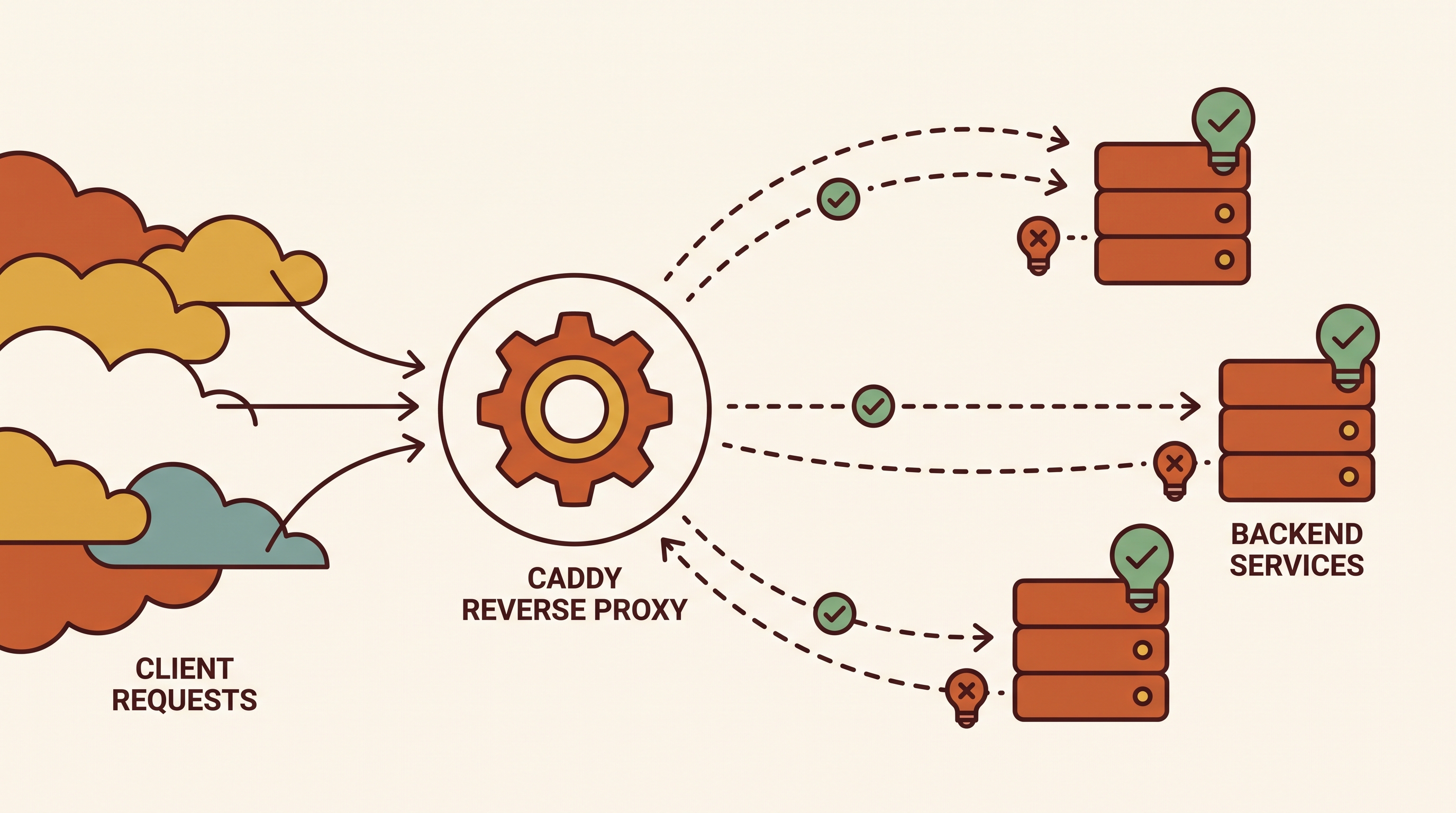
Fig. 02 — Reverse proxy config flow: incoming request hits Caddy, gets routed to the least-loaded backend, with health checks pulling bad nodes out of rotation.

Fig. 03 — On-demand TLS handshake: a new subdomain arrives, Caddy calls the ask endpoint, Let's Encrypt issues a cert via DNS-01, the cert is cached, and renewal is automatic 60 days later.
Comments
Discuss the article below. Markdown is supported. Sign in with email or GitHub to leave a comment.